Weekly planner
A weekly planner that does the planning for you
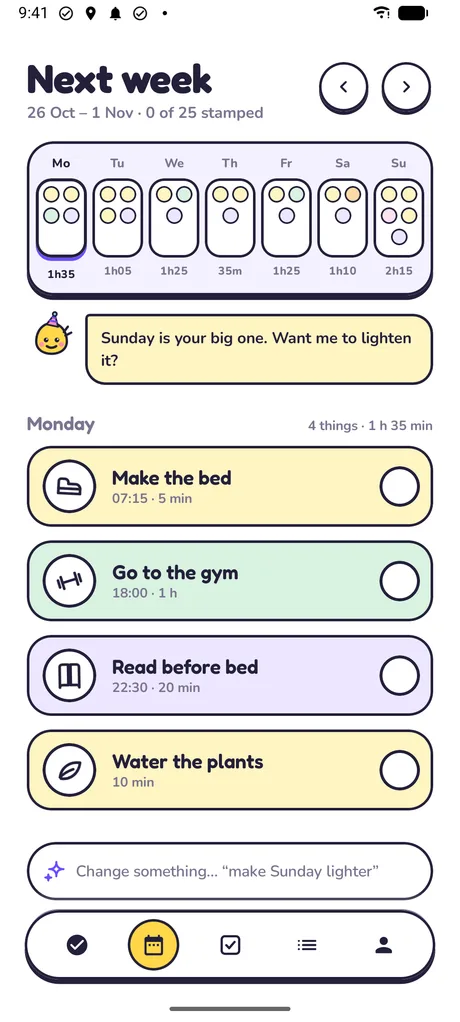
Most weekly planners hand you seven empty boxes. Cadie fills them. Tell her what your week holds and she spreads it across days that fit your work and sleep.
- Coming sooniPhone
- Coming soonAndroid
Free to start. No account, no login.
Why weekly planning stalls
Planning a week sounds like one job, but it is dozens of small decisions: which day for the big shop, how many workouts actually fit, whether laundry clashes with the late shift. A blank weekly grid asks you to make every one of them before you have done a single thing.
So the planner stays empty, or it gets filled in once with great intentions and abandoned by Wednesday. The plan was never the hard part. Re-planning, every time the week changes, is.
How Cadie plans a week
You say what matters. Cadie finds the days.
It starts from your words
“Gym three times a week, laundry, groceries at the weekend, call Mum on Sunday.” No templates and no fields to fill.
It fits around your hours
Cadie asks once when you wake, sleep and work, and remembers. Chores stay out of your working hours and away from bedtime.
It spreads the load
Three gym sessions become three different days. No single day gets piled up while another sits empty.
You see it before it's saved
The proposal is yours to check. Say “Looks good”, or ask for a different plan, and only then does it become your week.
When the week changes
Change the plan by saying so
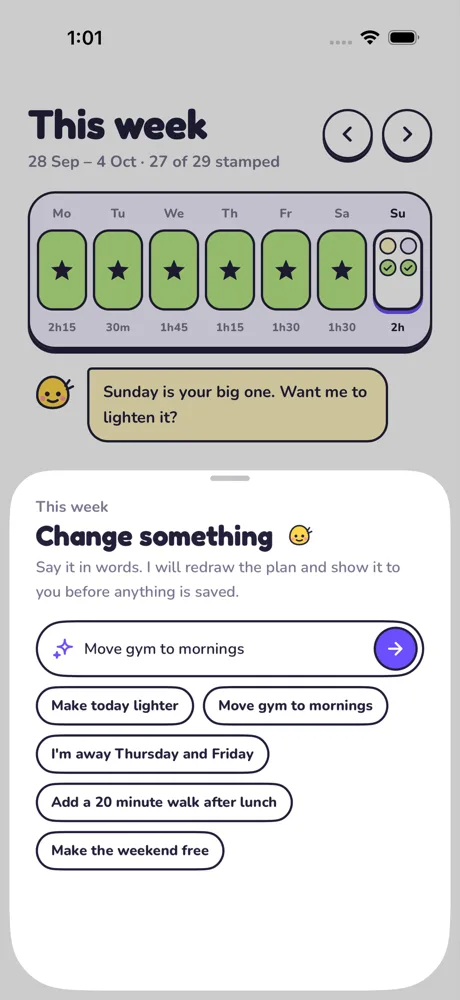
Type what changed, the way you would tell a friend. Cadie changes only what you asked and shows you the new week before anything is saved.
- “Move the gym to mornings”
- “I'm away Thursday and Friday”
- “Make Tuesday lighter”
- “Add a 20 minute walk after lunch”
Day to day
A small daily view, and a look back on Sunday
Each morning Today shows just today, split into morning, afternoon and evening, with a short note from Cadie. Tap a sticker to stamp it done.
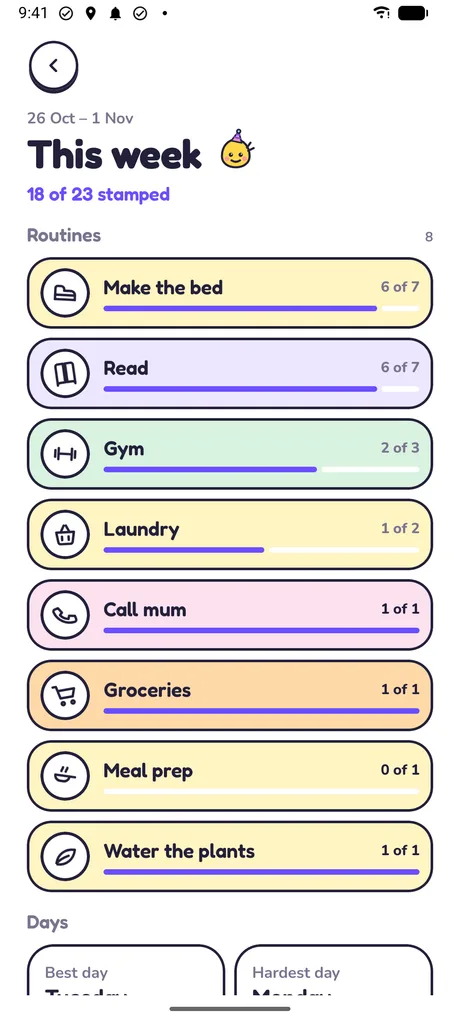
At the end of the week the review shows your best and hardest days and what slipped. With Pro, Cadie writes her own look back and suggests up to three changes for next week, each applied with a tap.
Questions
Weekly planning questions
What's the easiest way to plan a week?
Write down everything the week needs, decide how often each thing happens, then spread it across the days so none is overloaded, leaving room around work and sleep. Cadie does the last two steps for you: you write the list, she lays it out.
Can I plan my week without AI?
Yes. Cadie has a built-in planner that runs on your phone, works offline and is always free. The free plan also includes 1 AI-planned week; after that the built-in planner carries on.
Does Cadie connect to Google Calendar or Apple Calendar?
No. Cadie keeps her own plan on your phone and does not read or write your calendar. Tell her your working hours and fixed commitments and she plans around them.
Which day does the week start on?
Cadie's week runs Monday to Sunday. Things you do a set number of times a week are counted within each Monday-to-Sunday week.
Is a weekly planner app better than a paper one?
Paper is great for thinking. An app helps when the plan has to change: Cadie redraws the week when you say “I'm away Thursday”, reminds you at the right time and keeps count of what you've done.
What does it cost?
Planning your week is free. Cadie Pro, with 15 AI plans a week and the extras, is $7.99 a month or $49.99 a year, and the yearly plan starts with a 7-day free trial.
More on planning your week
Let Cadie lay out your week.
Tell her what's coming up. You'll have a week on the screen in seconds.
- Coming sooniPhone
- Coming soonAndroid